
Google is changing how your cookie consent works on 15 June. Here's how to tell if it affects you
Jun 05, 2026
Google is making a change on 15 June 2026 to how it handles advertising data from your website. Most businesses won't need to do anything, but for some this change will quietly switch on data collection that they had deliberately turned off. Here's how to work out whether this change affects you or not.
Does this change apply to you?
The change only affects you if both of these things are true:
- Your Google Analytics account is linked to a Google Ads account
- A setting called Google signals is switched off in your Analytics account
If your accounts aren't linked, or Google signals is already on, nothing changes for you on 15 June. You can stop reading here, although we'd suggest you don't, because there's a related problem further down that catches out far more businesses than this change will.
How to check in two minutes
You'll need access to your Google Analytics account (or ask whoever manages it for you).
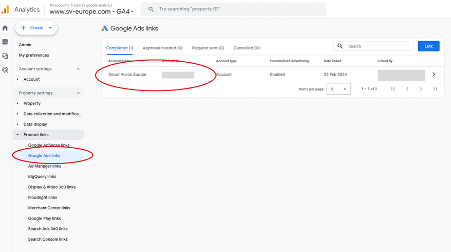
Check 1: are your accounts linked? In Google Analytics, click Admin (the cog at the bottom left), then look for Product links and click Google Ads links. If there's an Ads account listed there (as in the example shown below), you're linked.
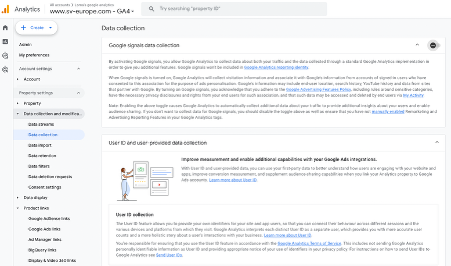
Check 2: is Google signals on or off? Still in Admin, go to Data collection and modification, then Data collection. You'll see Google signals data collection with a toggle.
Linked accounts plus Google signals off means this change affects you. Read on.
What these settings actually do
A quick recap of what these settings are actually doing for you.
Your cookie banner what visitors see when they land on your site, asking whether they're happy to be tracked.
Consent mode is the messenger. When a visitor clicks accept or reject on your cookie banner, consent mode passes that choice on to Google's tools (such as Google Analytics and Google Ads) so they know what they're allowed to do. The banner is the question, consent mode is the answer being delivered.
Google signals is a switch inside Google Analytics. Its main job is connecting your website data to people signed in to Google accounts, which powers things like demographics reports (working out the gender, interests and so on of people visiting your site). But until now it has also acted as a master off-switch: if Google signals was off, Google Analytics wouldn't collect the cookies and identifiers that let Google Ads recognise your visitors as individuals, regardless of what they said on your cookie banner. That's the data behind remarketing lists and ad targeting, as opposed to ordinary analytics like page views, which were never affected.
One caveat: this off-switch only ever covered data collected through Google Analytics. If you also run the Google Ads tag directly on your site, for conversion tracking for instance, that was never controlled by Google signals, only by your visitors' consent choices.
What's changing?
At the moment, two switches both need to be on before advertising cookies are collected from your visitors: the visitor's own consent choice and your Google signals setting. From 15 June, only the visitor's choice counts. Google signals stops being an off-switch for advertising data and goes back to just controlling those reports inside Analytics.
In other words, if your visitors consent to advertising cookies, Google Ads will use them, even if you switched Google signals off years ago precisely to stop that happening.
Google describes this as simplifying things, and in fairness it does remove a confusing overlap. But if you turned Google signals off as a privacy decision, that decision stops working on 15 June, and Google won't be asking you again before it does.
What to do if you're affected
You have two options, and which one is right depends on why Google signals was turned off in the first place.
If you're comfortable with advertising data flowing to Google Ads, you don't need to touch any settings. You may need to update your privacy policy, because it should accurately describe what data is collected and explain that visitors can see and delete this data via Google's My Activity page. If your policy currently says you don't share data with Google Ads, that will stop being true.
If you turned Google signals off deliberately and want to keep that protection, the off-switch has moved. It now lives in your consent setup: the default for something called ad_storage needs to be set to denied. This is a job for whoever manages your website tags or your cookie banner, and one sentence to send them is "please set the consent mode default for ad_storage to denied". Be aware this is a blunter instrument than Google signals was. It blocks all advertising cookies, which means your Google Ads conversion tracking and remarketing will take a real hit. There's a genuine trade-off here and it's worth a conversation before you decide.
If you can't get your privacy policy or settings sorted before 15 June, Google is offering a 90 day grace period. You have to request it via a form linked from their Help Centre announcement, so don't assume you'll get it automatically.
The bigger problem: a cookie banner that does nothing
Here's the part that applies to far more businesses than the change itself.
From 15 June, your visitors' consent choices become the only control over advertising data. Which is fine, as long as those choices are actually being heard. In our experience, a worrying number of cookie banners either aren't connected to anything or aren't working correctly. They look the part, visitors click reject, and the cookies get dropped anyway. The banner is asking the question of the visitor but nobody is delivering the answer to Google.
Until now, Google signals acted as a backstop for some of these sites. After 15 June there is no backstop. A broken banner means visitors who refused tracking will still get tracked, which is a compliance problem today and a bigger one once this change lands.
The simple test: open your site in a private browsing window, click reject on your banner, then look at what cookies have been set. If you're seeing cookies with names starting _ga or _gcl after rejecting, your banner isn't doing its job.
How to check what cookies are being set in Chrome
- Open your site in a private browser window / incognito mode in Chrome
- Right click on the page and select 'inspect'
- Click on the 'Application' tab
- Click on 'Cookies'
- Click on the name of the site
- Look at the list of cookies that are being dropped
- If you see any cookies that start with _ga or _gc then the chances are that Google Analytics tracking cookies are being dropped before the user has given consent
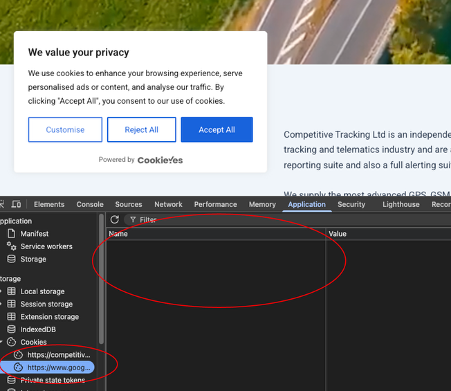
In the example below, no cookies are dropped before consent is given - the cookie area is blank.
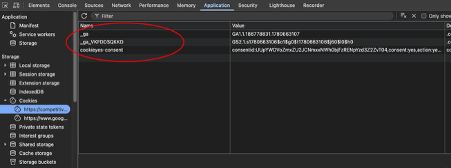
Once 'accept' is clicked on the consent bar, the cookies are dropped, as in the example below.
If that's beyond what you want to dig into, ask us or whoever looks after your site to check, it takes minutes.
One more thing
This is the first of several changes Google has announced in this area. Later in 2026 the settings controlling ads personalisation will be consolidated in the same way, and encrypted IP addresses will start flowing to linked Ads accounts. We'll cover both once Google confirms dates. For now, the job is the two minute check above, and making sure your cookie banner actually does what it appears to do.
Struggling to implement these strategies in your own business? You're not alone. Join our training webinars designed specifically for small and medium businesses ready to take their digital marketing to the next level. View our complete list of upcoming topics and training sessions.
